Path Tracing for Textured Meshes in OpenGL
University
IT University of Copenhagen
Game
OpenGL Path Tracer
Date
2025
Duration
2 Weeks
Team Size
Solo
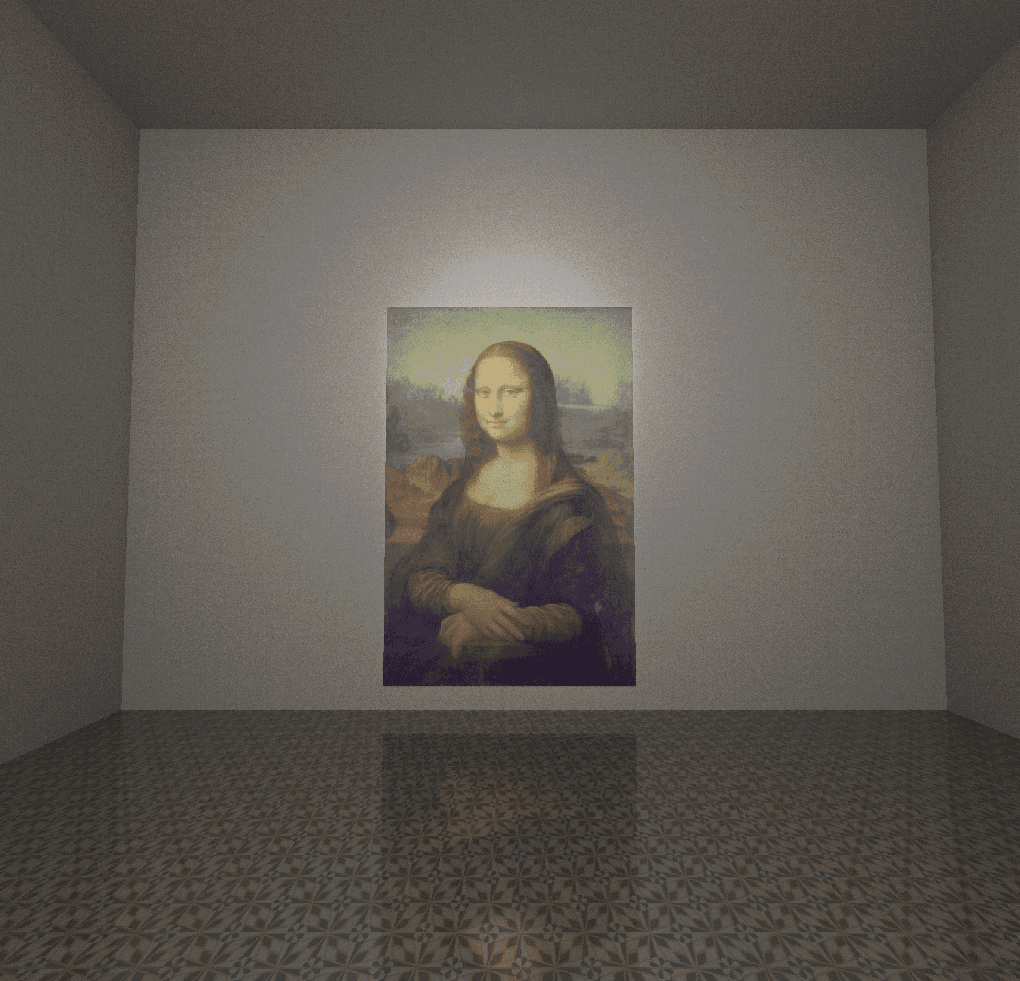
This project was created for the Graphics Programming course at the IT University of Copenhagen. After an earlier exercise where I implemented a simple path tracer for SDF shapes, I wanted to understand what it would take to move the same idea toward real mesh geometry. Not just as a visual trick, but as a data problem: how do I get triangle, transform, and material information into a place where the fragment shader can actually trace against it?
What I like about this project is that it sits right in the space between graphics theory and engine work. The rendering result was obviously important, but for me the more interesting part was building the bridge between a normal OpenGL mesh pipeline and a path tracer. That meant extending the course code, modifying the helper library, and turning mesh data into something the shader could reason about ray by ray.
Important Links
Motivation
I have been fascinated by ray tracing for a long time because it treats lighting as a physical simulation problem instead of only a rasterization problem. Reflections, soft shadows, and indirect lighting all come from the same core idea: follow the light path through the scene and evaluate what it hits. In the course, that worked nicely for SDFs because the intersection logic stays compact. Meshes are a very different story.
As soon as I moved to real geometry, OpenGL stopped giving me the information I needed for free. A fragment shader does not automatically know all neighboring vertices or the full triangle list of a model. So the project quickly became less about "adding one more feature" and more about building the data path myself. That shift was exactly what made the assignment worth doing for me.
Moving Mesh Data To The Shader
The first big step was deciding what information each triangle needs to carry. I stored positions, normals, UVs, a material id, and a transform id. That way the fragment shader could do more than only detect a hit. It could also recover the correct normal and texture coordinate at the hit point and then map the result back to the right material setup.
To feed all of this into the GPU, I added a ShaderStorageBufferObject wrapper to the ituGL helper library and used it to upload triangle data, transforms, and materials. The actual upload code is not very large, but it changed the whole structure of the project because it made the mesh scene available to the shader as explicit structured data.
void MeshRaytracingApplication::InitializeSSBO()
{
    std::vector<Triangle> collectedTriangleData;
    for (const auto& model : m_models)
    {
        const std::vector<Triangle>& meshData = model->GetMesh().GetTriangleData();
        collectedTriangleData.insert(
            collectedTriangleData.end(),
            meshData.begin(),
            meshData.end());
    }

    m_ssboTriangles.Bind();
    m_ssboTriangles.AllocateData(
        std::span(collectedTriangleData),
        BufferObject::Usage::StaticDraw);
    m_ssboTriangles.BindSSBO(1);

    m_ssboTransforms.Bind();
    m_ssboTransforms.AllocateData(
        std::span(m_transforms),
        BufferObject::Usage::StaticDraw);
    m_ssboTransforms.BindSSBO(2);

    m_ssboMaterials.Bind();
    m_ssboMaterials.AllocateData(
        sizeof(RaytracingMaterial) * m_materials.size(),
        m_materials.data(),
        BufferObject::Usage::StaticDraw);
    m_ssboMaterials.BindSSBO(3);
}
I also changed the mesh data model so I could assign material and transform ids during model loading. That was important because I wanted each imported mesh to remain a normal scene asset on the CPU side, while the shader received a flattened triangle list together with the information needed to put every hit back into the correct world-space context.
Tracing meshes in the fragment shader
Once the data was in place, the main shader task was straightforward in concept and expensive in practice: transform the ray into the mesh's local space, test it against triangles, keep the closest hit, and reconstruct shading data from that hit. I cache the last transform id while iterating over the triangles so I only recompute the inverse transform when the mesh changes.
bool RayMeshIntersection(
    Ray ray,
    mat4 view,
    inout float distance,
    inout vec3 normal,
    inout vec2 uv,
    inout uint material)
{
    uint lastTransformId = uint(-1);
    mat4 modelMatrix, modelViewMatrix, invModelViewMatrix;
    Ray localRay;
    bool hit = false;

    for (int i = 0; i < triangles.length(); ++i) {
        uint currentTransformId = triangles[i].transformId;

        if (currentTransformId != lastTransformId) {
            lastTransformId = currentTransformId;
            modelMatrix = meshTransforms[currentTransformId];
            modelViewMatrix = view * modelMatrix;
            invModelViewMatrix = inverse(modelViewMatrix);

            localRay.point = (invModelViewMatrix * vec4(ray.point, 1.0)).xyz;
            localRay.direction =
                normalize((invModelViewMatrix * vec4(ray.direction, 0.0)).xyz);
        }

        float t, u, v;
        if (RayTriangleIntersection(
                localRay.point,
                localRay.direction,
                triangles[i].v0.xyz,
                triangles[i].v1.xyz,
                triangles[i].v2.xyz,
                t,
                u,
                v) &&
            t < distance) {
            distance = t;
            hit = true;

            vec3 localNormal = normalize(
                triangles[i].normal0.xyz * (1.0 - u - v) +
                triangles[i].normal1.xyz * u +
                triangles[i].normal2.xyz * v);

            normal = normalize((modelViewMatrix * vec4(localNormal, 0.0)).xyz);
            uv = triangles[i].uv0 * (1.0 - u - v) +
                 triangles[i].uv1 * u +
                 triangles[i].uv2 * v;
            material = triangles[i].materialId;
        }
    }

    return hit;
}
What I especially like about this part is that it takes the abstract path tracing idea and makes it very concrete. A hit is not enough on its own. I still need interpolated normals for lighting, UVs for texture lookup, and a material id so I can pick the right albedo and surface properties. Once that was working, the project finally started to feel like a real textured scene instead of only a geometry test.
What I Learned
My small scene worked well enough for the course, but it also showed how quickly the method runs into scaling problems. With multiple bounces and a low triangle count, the image already needed noticeable time to stabilize. Pushing the triangle count further made it clear that this approach needs acceleration structures before it becomes practical.
That did not make the project less successful for me. Quite the opposite. I ended up with a working mesh path tracer in pure OpenGL, a better understanding of how rendering data has to be reshaped for custom shader work, and a very concrete list of next steps: BVHs for performance, texture arrays instead of hardcoded samplers, and a more correct refraction path for transparent materials. For a university project, that felt like exactly the right kind of result.