Space War - High performance programming with Unity DOTS
University
IT University of Copenhagen
Game
Space War
Date
2026
Duration
1 Month
Team Size
2
Space War was the final project for the High Performance Programming course at the IT University of Copenhagen. The idea was to build a large space battle where many small fighter entities attack bigger capital ships, while the implementation stays friendly to profiling, parallel execution, and the kind of data-oriented thinking that Unity ECS is built around.
My tasks in this project were the fighters and the asteroids. That meant I spent most of my time on the small ships that make the battle feel alive and on the environmental obstacles they need to navigate around.
My main tasks were the following:
- Build the fighter data layout and runtime settings for swarm behavior.
- Implement fighter target finding, neighbourhood search, steering, movement, and shooting systems.
- Create asteroid spawning and collision logic using Unity Physics queries.
- Work within an ECS setup that can be run on the main thread, scheduled, or in parallel for comparison.
Important Links
Building the fighter swarm
The fighter entities are where the project becomes interesting. On the design side, they should feel like a swarm of small ships, not a list of completely isolated agents. On the technical side, they should still remain lightweight enough that the simulation can scale well. Because of that, I structured the fighter behavior around a set of compact ECS systems where each step computes one part of the final steering decision.
Searching nearby entities
To make the fighters react to each other and to asteroids, I used a dedicated nearby-search system. Instead of directly deciding movement here, the system only gathers context. It checks which nearby entities count as neighbours for the swarm and which ones should be avoided, then stores those results in dynamic buffers for the next systems to consume.
partial struct NearbySearchJob : IJobEntity
{
    [ReadOnly] public FighterSettings Settings;
    [ReadOnly] public PhysicsWorld CurrentPhysicsWorld;

    void Execute(
        in LocalTransform localTransform,
        ref DynamicBuffer<NearbyFighterElement> swarmBuffer,
        ref DynamicBuffer<AvoidingEntityBufferElement> avoidanceBuffer,
        in Entity entity)
    {
        swarmBuffer.Clear();
        avoidanceBuffer.Clear();

        var pInput = new PointDistanceInput
        {
            Position = localTransform.Position,
            MaxDistance = Settings.NeighbourDetectionRadius,
            Filter = CollisionFilter.Default
        };

        var hits = new NativeList<DistanceHit>(Allocator.Temp);
        bool gotAny = CurrentPhysicsWorld.CollisionWorld.CalculateDistance(pInput, ref hits);
        if (!gotAny)
        {
            hits.Dispose();
            return;
        }

        for (int i = 0; i < hits.Length; ++i)
        {
            var body = CurrentPhysicsWorld.Bodies[hits[i].RigidBodyIndex];
            Entity hitEntity = body.Entity;

            if (hitEntity == Entity.Null || hitEntity == entity)
                continue;

            if ((body.CustomTags & (uint)PhysicsTags.Avoid) != 0)
            {
                avoidanceBuffer.Add(new AvoidingEntityBufferElement
                {
                    AvoidingEntity = hitEntity,
                    HitPosition = hits[i].Position,
                });
            }

            if ((body.CustomTags & (uint)PhysicsTags.Fighter) != 0)
            {
                swarmBuffer.Add(new NearbyFighterElement { entity = hitEntity });
            }
        }

        hits.Dispose();
    }
}
The system does not try to solve everything at once. It simply turns spatial queries into explicit data. The follow-up systems can then aggregate that data into alignment, separation, and crowding information without needing to repeat the collision query every time.
Combining steering signals into movement
Once those values are available, the movement system blends them into one final direction. The fighters align with their nearby neighbours, drift back toward the local group center, push away from avoidance targets, and still retain a clear pull toward the current attack target. The result is a small steering setup that gives the ships much more life than a simple move-toward-target implementation would.
void Execute(
    ref LocalTransform transform,
    ref FighterComponent fighterComponent,
    ref HealthComponent healthComponent)
{
    if (healthComponent.Health <= 0)
        return;

    float3 alignmentDirection = math.normalizesafe(fighterComponent.AlignmentDirection, float3.zero);
    float3 avoidanceDirection = math.normalizesafe(fighterComponent.AvoidanceDirection, float3.zero);
    float3 neighbourForceDirection = math.normalizesafe(
        fighterComponent.NeighbourCounterForceDirection,
        float3.zero);

    float3 toCenterDir = float3.zero;
    if (!fighterComponent.CrowdCenter.Equals(float3.zero))
        toCenterDir = math.normalizesafe(fighterComponent.CrowdCenter - transform.Position);

    fighterComponent.TargetDirection = math.normalizesafe(
        fighterComponent.CurrentTargetPosition - transform.Position,
        float3.zero);

    float3 newDirection =
        alignmentDirection * Settings.AlignmentFactor +
        avoidanceDirection * Settings.AvoidanceFactor +
        neighbourForceDirection * Settings.NeighbourCounterForceFactor +
        fighterComponent.TargetDirection * Settings.TargetTrendFactor +
        toCenterDir * Settings.CrowdingFactor;

    quaternion targetRot = transform.Rotation;
    if (!newDirection.Equals(float3.zero))
        targetRot = quaternion.LookRotationSafe(newDirection, math.up());

    float angle = math.acos(math.clamp(math.dot(transform.Rotation.value, targetRot.value), -1f, 1f)) * 2f;
    float normalizedAngle = math.saturate(angle / math.PI);

    float dynamicRotationSpeed = math.lerp(
        Settings.MinRotationSpeed,
        Settings.MaxRotationSpeed,
        normalizedAngle);

    transform.Rotation = math.normalize(
        math.slerp(transform.Rotation, targetRot, dynamicRotationSpeed * deltaTime));

    float dynamicSpeed = math.lerp(
        Settings.MinSpeed,
        Settings.MaxSpeed,
        math.clamp(200 / math.length(newDirection), 0, 1));

    transform.Position += transform.Forward() * dynamicSpeed * deltaTime;
}
Each direction contribution has a clear purpose, and the final speed and rotation are adjusted dynamically based on the resulting target direction. That helped the fighters feel more responsive while still preserving a swarm-like look.
Asteroids as environmental pressure
The asteroid work gave the battle more shape. They create a bit of chaos in the sawrm behaviour which leads to interesting movement. With the asteroids in place, the fighters also need to react to their environment, and the scene gets an additional layer of motion and risk.
Spawning physics-driven obstacles
The asteroid spawning system instantiates the prefab once at the beginning, randomizes position, scale, and velocity, and assigns a physics collider that the rest of the simulation can use. This keeps the spawn logic fairly small, but it gives the scene a lot of variety because the obstacles do not all move or rotate in exactly the same way.
public void OnUpdate(ref SystemState state)
{
    var config = SystemAPI.GetSingleton<Config>();
    state.Enabled = false;

    for (int i = 0; i < config.AsteroidCount; i++)
    {
        var asteroidEntity = state.EntityManager.Instantiate(config.AsteroidPrefab);

        var randomTransform = TransformUtils.CreateRandomTransform(
            config.MinSpawningBounds,
            config.MaxSpawningBounds,
            UnityEngine.Random.rotation);

        randomTransform.Scale = RandomFloat(0.15f, 0.5f);
        state.EntityManager.SetComponentData(asteroidEntity, randomTransform);

        state.EntityManager.SetComponentData(asteroidEntity, new PhysicsCollider
        {
            Value = asteroidCollider,
        });

        var asteroidComponentData = state.EntityManager.GetComponentData<AsteroidComponent>(asteroidEntity);
        asteroidComponentData.SphereRadius = radius;
        state.EntityManager.SetComponentData(asteroidEntity, asteroidComponentData);

        if (state.EntityManager.HasComponent<PhysicsVelocity>(asteroidEntity))
        {
            state.EntityManager.SetComponentData(asteroidEntity, new PhysicsVelocity
            {
                Linear = RandomFloat3(-1f, 1f),
                Angular = RandomFloat3(-0.5f, 0.5f)
            });
        }
    }
}
A small detail I liked in this system is that the asteroid data stores the sphere radius explicitly. That makes the following collision logic much easier, because the collision query can work directly with the radius and the current scale instead of having to infer everything from the prefab again.
Special collision treatment
One of the exam requirements was to use Unity Physics rigid bodies. Because of that, I added aRigidBodyComponent to the asteroid prefab, which allows the asteroids to bounce off each other and gives them a more physical presence in the scene. Fighters are handled a bit differently. For them, the system performs a physics distance query for each asteroid and checks which overlapping entities are tagged as fighters. When a hit is found, the asteroid writes a damage event into a buffer that another system can resolve afterwards to destroy the ship.
partial struct AsteroidCollisionJob : IJobEntity
{
    [ReadOnly] public PhysicsWorld CurrentPhysicsWorld;

    void Execute(
        ref LocalTransform localTransform,
        ref AsteroidComponent asteroidComponent,
        ref DynamicBuffer<HitBufferElement> hitBuffer,
        in Entity entity)
    {
        hitBuffer.Clear();

        var pInput = new PointDistanceInput
        {
            Position = localTransform.Position,
            MaxDistance = asteroidComponent.SphereRadius * localTransform.Scale,
            Filter = CollisionFilter.Default
        };

        var hits = new NativeList<DistanceHit>(Allocator.Temp);
        bool gotAny = CurrentPhysicsWorld.CollisionWorld.CalculateDistance(pInput, ref hits);
        if (!gotAny)
        {
            hits.Dispose();
            return;
        }

        for (int i = 0; i < hits.Length; ++i)
        {
            var body = CurrentPhysicsWorld.Bodies[hits[i].RigidBodyIndex];
            Entity hitEntity = body.Entity;

            if (hitEntity == Entity.Null || hitEntity == entity)
                continue;

            if ((body.CustomTags & (uint)PhysicsTags.Fighter) != 0)
            {
                hitBuffer.Add(new HitBufferElement
                {
                    TargetEntity = hitEntity,
                    Damage = 1,
                });
            }
        }

        hits.Dispose();
    }
}
Asteroids use rigid body physics when interacting with each other, while fighter collisions stay in a lightweight ECS-style flow. The asteroid system does not apply damage directly. It only records hit data, which keeps the collision pass focused and works well with multi-threaded execution.
Simulation Debug Overlay
It was important for the simulation to have tooling that made it easy to change values while the battle was running. Because of that, I implemented a debug overlay that exposes the fighter movement factors, the job scheduling mode, the number of spawned entities, and several other simulation settings. That made it much easier to tune the behavior and immediately see how each change affected the overall result.
One detail that stands out clearly in the video is the frame rate counter in the top right corner. When switching from main thread execution to Unity jobs running in parallel, the performance increase becomes easy to spot. The simulation is built around heavily parallelized systems, so it performs best when using ScheduleParallel.
Simulation Benchmark
As a group, we also ran a benchmark to measure how entity count and parallel execution affected the simulation. Each test used two Star Destroyers and 500 asteroids, while the number of fighters was increased step by step to 500, 2,000, 5,000, and 10,000. All values were configured through the in-game UI so the setup stayed consistent across all runs.
The benchmark was performed on a machine with the following specifications:
- AMD Ryzen 7 7840HS
- NVIDIA GeForce RTX 4070 Laptop GPU
- Samsung M425R2GA3PB0-CWMOD DDR5 32GB
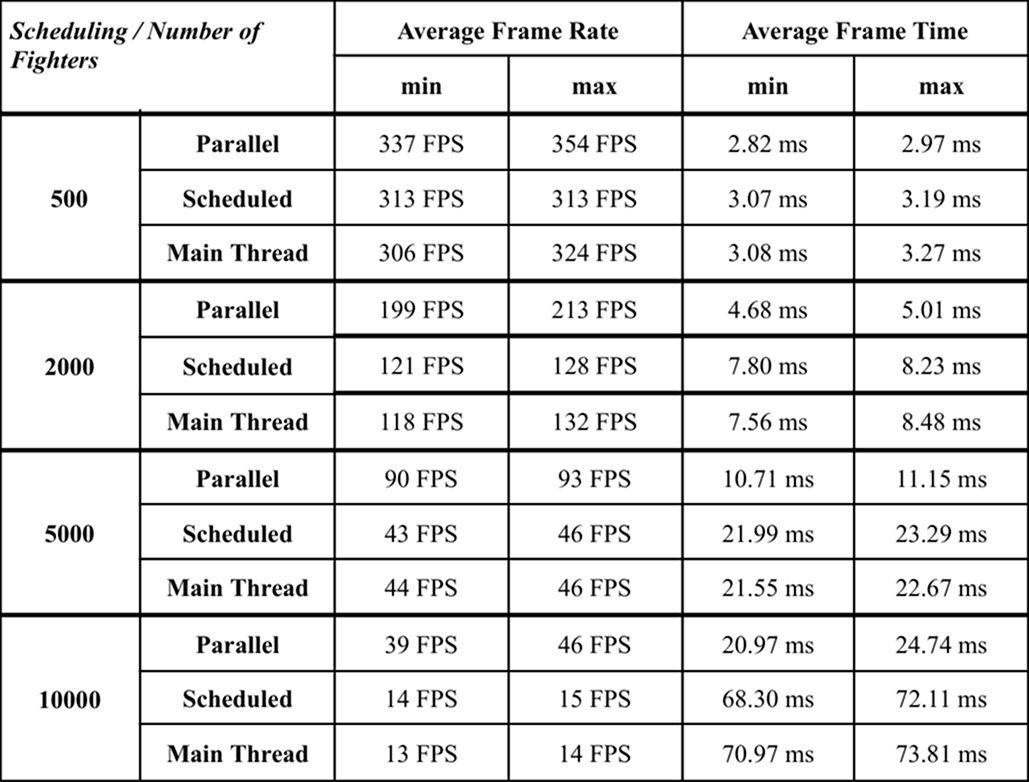
For each configuration, we recorded the average frame rate and average frame time over 300 simulation frames. We also logged the minimum and maximum values observed during the same period. This made it possible to capture both the typical performance and the worst spikes, which matters in a simulation where entity destruction and combat events can briefly increase the workload.